
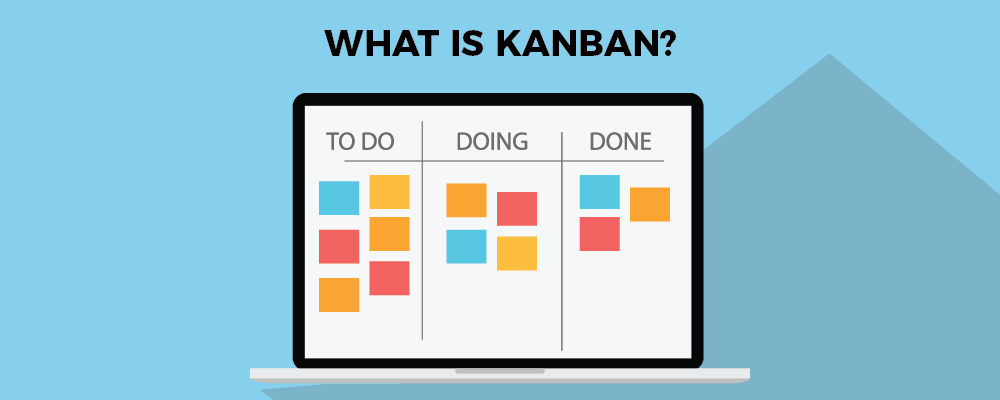
A Kanban board turns your messy to-do list into a clear visual flow — so your team always knows what's happening and what's next.
What Is a Kanban Board? (And Why Your Team Probably Needs One)
Have you ever felt like your team's tasks are scattered everywhere — sticky notes, emails, half-updated spreadsheets — and nobody really knows who's doing what? That's exactly the problem a Kanban board solves. It's not some fancy enterprise tool or a complicated project management system. At its core, a Kanban board is just a visual way to see your work, move it forward, and get things done. Let's break it down properly.
What Is Kanban? The Origin (The Quick Version)
Kanban started on the factory floors of Toyota in the 1940s. Engineers needed a simple way to manage the flow of parts without overproducing or creating bottlenecks. Their solution? Cards. Each card represented a task or a batch of work, and it moved through different stages — from "needed" to "in production" to "done." The word Kanban itself is Japanese for "visual signal" or "card."
Fast forward to today, and the same idea has been adopted by software teams, marketing departments, freelancers, and even families managing household chores. The concept is that simple and that powerful.
What Is a Kanban Board, Exactly?
A Kanban board is a visual project management tool that organizes tasks into columns, where each column represents a stage of your workflow. The most basic version looks like this:
- To Do — tasks waiting to be started
- In Progress — tasks actively being worked on
- Done — completed tasks
Each task lives on a card, and as work progresses, cards move from left to right across the board. That's it. No complicated dashboards, no lengthy status reports — just a shared view of reality that anyone on your team can understand at a glance.
Of course, you can customize your columns to match your actual workflow. A marketing team might have columns like Ideas → Writing → Review → Published. A software team might use Backlog → Development → Testing → Deployed. The structure adapts to you, not the other way around.
How Does a Kanban Board Work in Practice?
Let's say you run a small e-commerce business and you have five things on your plate this week: write product descriptions, update the homepage banner, reply to supplier emails, test the checkout flow, and post on social media. Without a system, these tasks float around your head (or get buried in a chat app). With a Kanban board, you'd create a card for each one and place them all in the To Do column.
As you start working on the homepage banner, you drag that card to In Progress. When it's done, it moves to Done. Simple, visual, satisfying. Your team (or just you) always knows the current status without a single status meeting.
One of the most powerful ideas in Kanban is limiting how many tasks can be In Progress at the same time — this is called a WIP limit (Work In Progress limit). The idea is to finish things before starting new ones. It sounds obvious, but most people and teams are guilty of juggling too many things at once, which leads to nothing actually getting finished. Kanban gently forces you to focus.
Kanban Board vs. To-Do List: What's the Difference?
A to-do list tells you what needs to be done. A Kanban board tells you what needs to be done, who's doing it, where it stands, and what's blocking it. That's a big difference, especially once you have more than a handful of tasks or more than one person involved.
To-do lists also have a dirty secret: they tend to grow forever and never shrink. Items sit there for weeks, quietly generating guilt. A Kanban board, by contrast, makes bottlenecks visible. If five cards are stuck in the "Review" column and nothing is moving to "Done," that's a signal — something needs attention. You can see problems before they become disasters.
Who Uses Kanban Boards?
Short answer: almost everyone. Kanban boards are used across industries and team sizes because the underlying idea — visualize your work, limit multitasking, keep things moving — is universally useful. Here are a few common examples:
- Software development teams use Kanban to manage features, bug fixes, and releases without the rigid sprint structure of Scrum.
- Marketing teams track campaigns, content calendars, and creative requests through a shared board.
- Small business owners manage client projects, invoices, and operational tasks in one place.
- Freelancers keep track of multiple client deliverables without letting anything slip through the cracks.
- HR and operations teams manage hiring pipelines, onboarding checklists, and internal processes.
If work exists, Kanban can probably help organize it.
Kanban vs. Scrum: Are They the Same Thing?
This is one of the most common questions, and it's a fair one. Both Kanban and Scrum fall under the Agile umbrella — a broader philosophy about flexible, iterative work. But they're quite different in practice.
- Scrum works in fixed time periods called sprints (usually 2 weeks). Teams plan what they'll do, work through it, then review and repeat. It has specific roles like Scrum Master and Product Owner, and regular ceremonies like daily standups and sprint retrospectives.
- Kanban has no fixed time periods. Work flows continuously. There are no mandatory roles or ceremonies. It's more flexible and often easier to adopt, especially for teams that aren't doing pure software development.
Neither is better — they solve slightly different problems. Many teams even blend both approaches, which is sometimes called Scrumban. But if you're looking for something quick to get started with, Kanban wins every time. You can be up and running in ten minutes.
Physical Kanban Board vs. Online Kanban Board
Traditionally, Kanban boards were physical — a whiteboard with columns drawn in marker and sticky notes as cards. There's something genuinely satisfying about physically moving a sticky note to "Done." If your team is always in the same room, a physical board can work great.
But for most teams today — remote, hybrid, or just too busy to huddle around a whiteboard — an online Kanban board is the practical choice. It's accessible from anywhere, automatically saved, shareable with the whole team, and searchable. Cards can hold descriptions, deadlines, attachments, and assignees. No one has to decode someone else's handwriting.
If you want to try a Kanban board without installing anything or paying for a subscription, SimplyKanban is a clean, free online Kanban board that gets straight to the point. No bloat, no learning curve — just create a board and start adding cards. It's a great place to start, especially if you're new to Kanban or want to test the method before committing to a bigger tool.
Key Benefits of Using a Kanban Board
Let's summarize why so many people and teams stick with Kanban once they try it:
- Instant visibility — Everyone can see the full picture of work without asking for updates.
- Less multitasking — WIP limits encourage focus and actually finishing things.
- Flexibility — No sprints, no forced rituals. You adapt the system to your workflow.
- Bottleneck detection — Columns that pile up are easy to spot and fix.
- Easy onboarding — New team members understand a Kanban board in minutes, not days.
- Works for any team size — From a solo freelancer to a 50-person department.
How to Set Up Your First Kanban Board
Getting started is easier than you think. Here's a simple approach for beginners:
- Choose your tool — A whiteboard with sticky notes works, but an online tool is more practical. SimplyKanban is free and requires no sign-up to explore — great for a first try.
- Define your columns — Start with three: To Do, In Progress, Done. You can always add more later.
- Add your tasks as cards — Write one task per card. Don't overthink it.
- Assign and prioritize — If you're working with a team, assign cards to people. Put the most important tasks at the top of each column.
- Set a WIP limit — Decide how many cards can be In Progress at once. A common starting point is 2–3 per person.
- Start moving cards — Work through your tasks and physically (or digitally) move them across the board. That feeling when a card reaches "Done" is addictive in the best way.
Is Kanban the Right Method for You?
Kanban is a great fit if your work is ongoing and doesn't fit neatly into fixed time blocks, if your team gets interrupted by new requests frequently, if you want a lightweight system that doesn't require a consultant to set up, or if you've tried heavier project management tools and found them overwhelming.
It's less ideal if your work requires very strict deadline enforcement across multiple dependencies (a full project management tool might serve you better), or if your organization already runs well on Scrum and your team is happy with it.
But honestly? For most small teams and business owners, Kanban is the sweet spot between "no system at all" and "too much process." It's just the right amount of structure.
Conclusion
A Kanban board is one of the simplest and most effective tools you can add to your workflow. It gives you clarity, reduces chaos, and helps your team move work forward without constant check-ins or status meetings. Whether you're managing a product launch, a client project, or your own daily tasks, Kanban adapts to your reality.
The best way to understand it is to try it. Head over to SimplyKanban — a free online Kanban board — set up your first board in a few minutes, and see how it feels. You might be surprised how much calmer your workday becomes when everything is visible and in its place.